library(tidyr)
library(dplyr, warn.conflicts = FALSE)
library(tibble)
library(purrr)
library(glue)
library(ggplot2)
library(ksCompare)Powerful Data Validation Engine
R
QC
Clinical Trials
Data analysis
Data Management
Explore a validation framework centered around single simple function

Introduction
Data validation is a critical component of any data analysis pipeline. In this article, we’ll explore a powerful validation framework centered around the ks_check_rules() function from the ksCompare package (GitHub or R-universe). This function provides a flexible, declarative approach to validating data frames with comprehensive error reporting.
Overview
The ks_check_rules() function we introduced implements a flexible rule-based validation system for data frames. It enables specifying validation rules as a list of named rule objects, applying them against your data, and collecting results systematically.
Key Features
- Declarative rules: Define validation logic in a clean, reusable structure
- Two evaluation modes: “first” (stops at first failure) vs. “all” (checks all rules)
- Rich diagnostics: Detailed error messages per row
- Integration-friendly: Returns enhanced data frame with results
Core Concepts
Rule Structure
Each rule is a list containing two required elements:
rule <- list(
  expr = ~ CONDITION_HERE,     # One-sided formula with logical expression
  msg = "Error message"        # Message for failing rows
)
Important: The expression should evaluate to TRUE for failing rows. While this may seem counter-intuitive at first, it follows the convention of defining “failure conditions” rather than “passing conditions.”
Data Structure
Your data frame can contain any mix of variable types. Rules will be applied row-wise.
Result Structure
The return value is your original data frame with an additional column called check_msgs, a list-column where each element contains:
"OK"for rows that pass all validation rules- In
"first"mode: The first failing message (or"OK") - In
"all"mode: A character vector of all violated messages (or"OK")
Usage Examples
Complete Example
Example data:
# Sample data with intentional errors
adsl <- tibble(
  USUBJID = sprintf("01-%03d", 1:6),
  AGE = c(34, 52, -1, -3, 29, 70),
  SEX = c("M", "F", "M", NA, "F", "X"),
  WEIGHT = c(70, 80, 75, 500, 65, 68)
)
Validation rules
Best practice: Group related rules together and use descriptive names. While not mandatory, named rules improve code maintainability and make debugging easier:
# Define validation rules
rules <- list(
  # Rule 1: Age must be non-negative
  age_non_negative = list(
    expr = ~ AGE < 0,
    msg = "AGE must be non-negative"
  ),

  # Rule 2: SEX cannot be missing
  sex_not_missing = list(
    expr = ~ is.na(SEX),
    msg = "SEX is missing"
  ),

  # Rule 3: SEX must be M or F (ignoring missing)
  sex_valid = list(
    expr = ~ !is.na(SEX) & !(SEX %in% c("M", "F")),
    msg = "SEX must be M/F"
  ),

  # Rule 4: WEIGHT within reasonable range
  weight_range = list(
    expr = ~ WEIGHT > 300,
    msg = "WEIGHT out of range"
  )
)
Let’s extend our rules with some advanced expressions. We can use regular expressions easily:
rules <- append(rules, list(
  # --- Study Subject Identifier ---
  usubjid_format = list(
    expr = ~ !grepl("^\\d{2}-\\d{3}$", USUBJID),
    msg = "USUBJID must match format: XX-XXX-XXX"
  )
))

ks_check_rules(adsl, rules, mode = "all") |>
  ks_collapse_check_msgs(col = check_msgs)
# A tibble: 6 × 5
USUBJID AGE SEX WEIGHT check_msgs
<chr> <dbl> <chr> <dbl> <chr>
1 01-001 34 M 70 OK
2 01-002 52 F 80 OK
3 01-003 -1 M 75 AGE must be non-negative
4 01-004 -3 <NA> 500 AGE must be non-negative; SEX is missing; WEIGHT o…
5 01-005 29 F 65 OK
6 01-006 70 X 68 SEX must be M/F Apply rules in first-failing mode:
result_first <- ks_check_rules(adsl, rules, mode = "first") |>
  ks_collapse_check_msgs(col = check_msgs)

result_first[, c("USUBJID", "check_msgs")]
# A tibble: 6 × 2
USUBJID check_msgs
<chr> <chr>
1 01-001 OK
2 01-002 OK
3 01-003 AGE must be non-negative
4 01-004 AGE must be non-negative
5 01-005 OK
6 01-006 SEX must be M/F Apply rules collecting all failures:
result_all <- ks_check_rules(adsl, rules, mode = "all") |>
  ks_collapse_check_msgs(col = check_msgs)

result_all[, c("USUBJID", "check_msgs")]
# A tibble: 6 × 2
USUBJID check_msgs
<chr> <chr>
1 01-001 OK
2 01-002 OK
3 01-003 AGE must be non-negative
4 01-004 AGE must be non-negative; SEX is missing; WEIGHT out of range
5 01-005 OK
6 01-006 SEX must be M/F Mode Comparison
| Feature | First Mode | All Mode |
|---|---|---|
| Row processing | Stops at first failure | Checks all rules |
| Performance | Faster (shorter evaluation) | Slower (complete check) |
| Result detail | Minimalist (one message max) | Complete (all relevant messages) |
| Use case | General validation | Thorough validation |
When to Use Which?
# Typical use cases

# Quick validation - stop at first issue found
quick_check <- ks_check_rules(adsl, rules, mode = "first")

quick_check
# A tibble: 6 × 5
USUBJID AGE SEX WEIGHT check_msgs
<chr> <dbl> <chr> <dbl> <list>
1 01-001 34 M 70 <chr [1]>
2 01-002 52 F 80 <chr [1]>
3 01-003 -1 M 75 <chr [1]>
4 01-004 -3 <NA> 500 <chr [1]>
5 01-005 29 F 65 <chr [1]>
6 01-006 70 X 68 <chr [1]> # Comprehensive validation - get all issues for full validation
full_audit <- ks_check_rules(adsl, rules, mode = "all")
full_audit# A tibble: 6 × 5
USUBJID AGE SEX WEIGHT check_msgs
<chr> <dbl> <chr> <dbl> <list>
1 01-001 34 M 70 <chr [1]>
2 01-002 52 F 80 <chr [1]>
3 01-003 -1 M 75 <chr [1]>
4 01-004 -3 <NA> 500 <chr [3]>
5 01-005 29 F 65 <chr [1]>
6 01-006 70 X 68 <chr [1]> # Quality assurance check - ensure no errors exist
strict_validation <- function(data, rules) {
result <- ks_check_rules(data, rules, mode = "all")
valid <- purrr::map_lgl(result$check_msgs, ~ "OK" %in% .x)
if (!all(valid)) {
msgs <- unique(unlist(result$check_msgs[!valid]))
stop(
paste0(
"Validation failed:\n",
paste0(" - ", msgs, collapse = "\n")
),
call. = FALSE
)
}
invisible(result)
}
# Demonstrate the strict validation error handling
tryCatch(
strict_validation(adsl, rules),
error = function(e) {
cat("Error caught as expected:\n")
cat(conditionMessage(e), "\n")
}
)Error caught as expected:
Validation failed:
- AGE must be non-negative
- SEX is missing
- WEIGHT out of range
- SEX must be M/F Performance Tips
- Order matters in “first” mode: Place faster-to-evaluate rules first for performance gain
- Group related columns: Organize rules by data columns for better organization
- Use vectorized operations: Write expressions using vectorized functions
Error Message Design
Follow these guidelines for effective messages:
- Be specific: Identify exactly what’s wrong
- Suggest correction: Include acceptable formats when helpful
- Reference standards: Mention relevant regulations or guidelines
- Use consistent format: Maintain uniform wording conventions
GOOD: "Date format must be YYYY-MM-DD. Value: '01/01/2025' is invalid."

BAD:  "Invalid date"
Advanced Usage
# Using rlang expressions for dynamic rules
dynamic_age <- function(threshold_age) {
  list(
    age_threshold = list(
      expr = rlang::new_formula(
        lhs = NULL,
        rhs = rlang::expr(AGE < !!threshold_age)
      ),
      msg = sprintf(
        "Age must be at least %d years",
        threshold_age
      )
    )
  )
}

# Define rule
validation_age <- dynamic_age(18)
We can check our dynamic rules.
- Rule:
validation_age$age_threshold$expr=> ~AGE < 18. - Message:
validation_age$age_threshold$msg=> Age must be at least 18 years.
You can also verify the expression evaluates correctly:
rlang::eval_tidy(
  rlang::f_rhs(validation_age$age_threshold$expr),
  data = adsl
)
[1] FALSE FALSE TRUE TRUE FALSE FALSE# Expected:
# [1] FALSE FALSE TRUE TRUE FALSE FALSE
result <- ks_check_rules(adsl, validation_age)
result |> mutate(
check_msgs = map_chr(check_msgs, ~ paste(.x, collapse = ", "))
)# A tibble: 6 × 5
USUBJID AGE SEX WEIGHT check_msgs
<chr> <dbl> <chr> <dbl> <chr>
1 01-001 34 M 70 OK
2 01-002 52 F 80 OK
3 01-003 -1 M 75 Age must be at least 18 years
4 01-004 -3 <NA> 500 Age must be at least 18 years
5 01-005 29 F 65 OK
6 01-006 70 X 68 OK Categorizing Violations
You can post-process results to categorize violations:
classify_violations <- function(df) {
  df %>%
    mutate(
      violation_type = map_chr(
        check_msgs,
        ~ if ("OK" %in% .x) "clean" else "dirty"
      ),
      num_violations = map_int(
        check_msgs,
        ~ if ("OK" %in% .x) 0L else n_distinct(.x)
      )
    )
}

validation_result <- ks_check_rules(adsl, rules, mode = "all")

classified_data <- classify_violations(validation_result)

classified_data
# A tibble: 6 × 7
USUBJID AGE SEX WEIGHT check_msgs violation_type num_violations
<chr> <dbl> <chr> <dbl> <list> <chr> <int>
1 01-001 34 M 70 <chr [1]> clean 0
2 01-002 52 F 80 <chr [1]> clean 0
3 01-003 -1 M 75 <chr [1]> dirty 1
4 01-004 -3 <NA> 500 <chr [3]> dirty 3
5 01-005 29 F 65 <chr [1]> clean 0
6 01-006 70 X 68 <chr [1]> dirty 1Generating Summary Reports
generate_report <- function(df, rules = NULL) {

  violations_summary <- df %>%
    filter(!map_lgl(check_msgs, ~ "OK" %in% .x)) %>%
    unnest_longer(check_msgs) %>%
    count(check_msgs, name = "count") %>%
    rename(message = check_msgs)

  n_valid <- sum(map_lgl(df$check_msgs, ~ "OK" %in% .x))
  n_invalid <- nrow(df) - n_valid

  cat("# Data Validation Report\n\n")

  cat("## Summary Statistics\n\n")
  cat("- Total rows checked:", nrow(df), "\n")
  cat("- Violating rows:", n_invalid, "\n")
  cat("- Valid rows:", n_valid, "\n\n")

  cat("## Violation Breakdown\n\n")

  print(violations_summary)
}


generate_report(validation_result, rules)
# Data Validation Report
## Summary Statistics
- Total rows checked: 6
- Violating rows: 3
- Valid rows: 3
## Violation Breakdown
# A tibble: 4 × 2
message count
<chr> <int>
1 AGE must be non-negative 2
2 SEX is missing 1
3 SEX must be M/F 1
4 WEIGHT out of range 1Visualizing Validation Results
There are several possibilities to visualize a validation:
# For a single-row heatmap-like display, add a constant y value.
visualize_results1 <- function(df) {

  df <- df %>%
    mutate(
      status = factor(
        ifelse(
          map_lgl(check_msgs, ~ "OK" %in% .x),
          "Valid",
          "Invalid"
        ),
        levels = c("Valid", "Invalid")
      ),
      y = "Subjects"
    )

  ggplot(df, aes(x = USUBJID, y = y, fill = status)) +
    geom_tile(height = 0.6, color = "white") +
    scale_fill_manual(
      values = c(
        Valid = "#2ecc71",
        Invalid = "#e74c3c"
      )
    ) +
    labs(x = "Subject", y = NULL, fill = "Status") +
    theme_minimal() +
    theme(
      axis.text.x = element_text(angle = 45, hjust = 1)
    )
}

# Alternative: Bar chart (usually more informative)
visualize_results2 <- function(df) {

  df %>%
    mutate(
      status = ifelse(
        purrr::map_lgl(check_msgs, ~ "OK" %in% .x),
        "Valid",
        "Invalid"
      )
    ) %>%
    ggplot(aes(status, fill = status)) +
    geom_bar() +
    scale_fill_manual(
      values = c(
        Valid = "#2ecc71",
        Invalid = "#e74c3c"
      )
    ) +
    labs(
      x = NULL,
      y = "Number of records",
      fill = "Status"
    ) +
    theme_minimal()
}

# Alternative: Show number of violations per subject
# If subjects can have multiple violations, this is often the most useful diagnostic plot:

visualize_results3 <- function(df) {

  df %>%
    mutate(
      n_violations = map_int(
        check_msgs,
        ~ if ("OK" %in% .x) 0L else length(.x)
      )
    ) %>%
    ggplot(aes(reorder(USUBJID, n_violations), n_violations)) +
    geom_col() +
    coord_flip() +
    labs(
      x = "Subject",
      y = "Number of violations"
    ) +
    theme_minimal()
}

# Example visualization
visualize_results1(validation_result)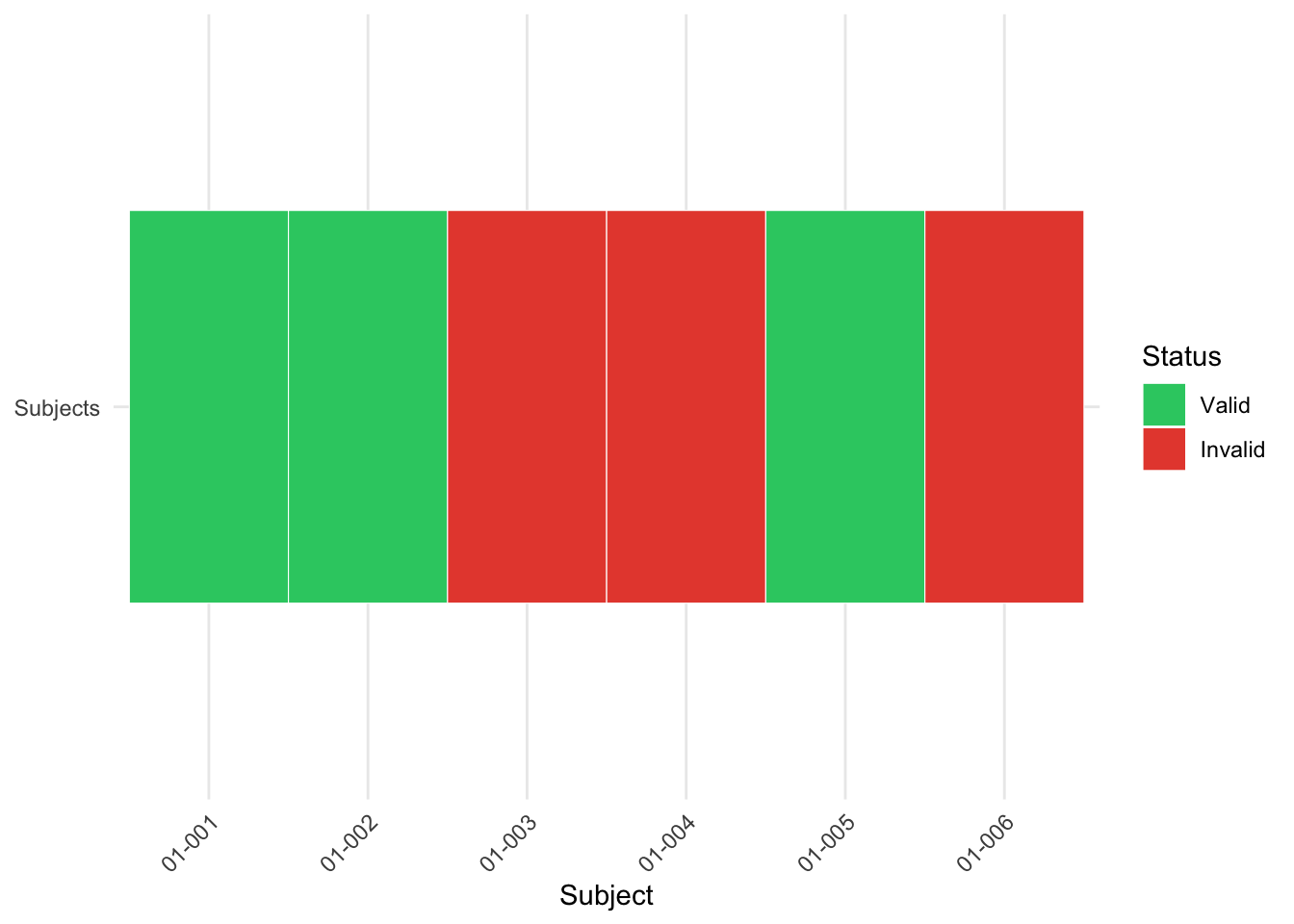
visualize_results2(validation_result)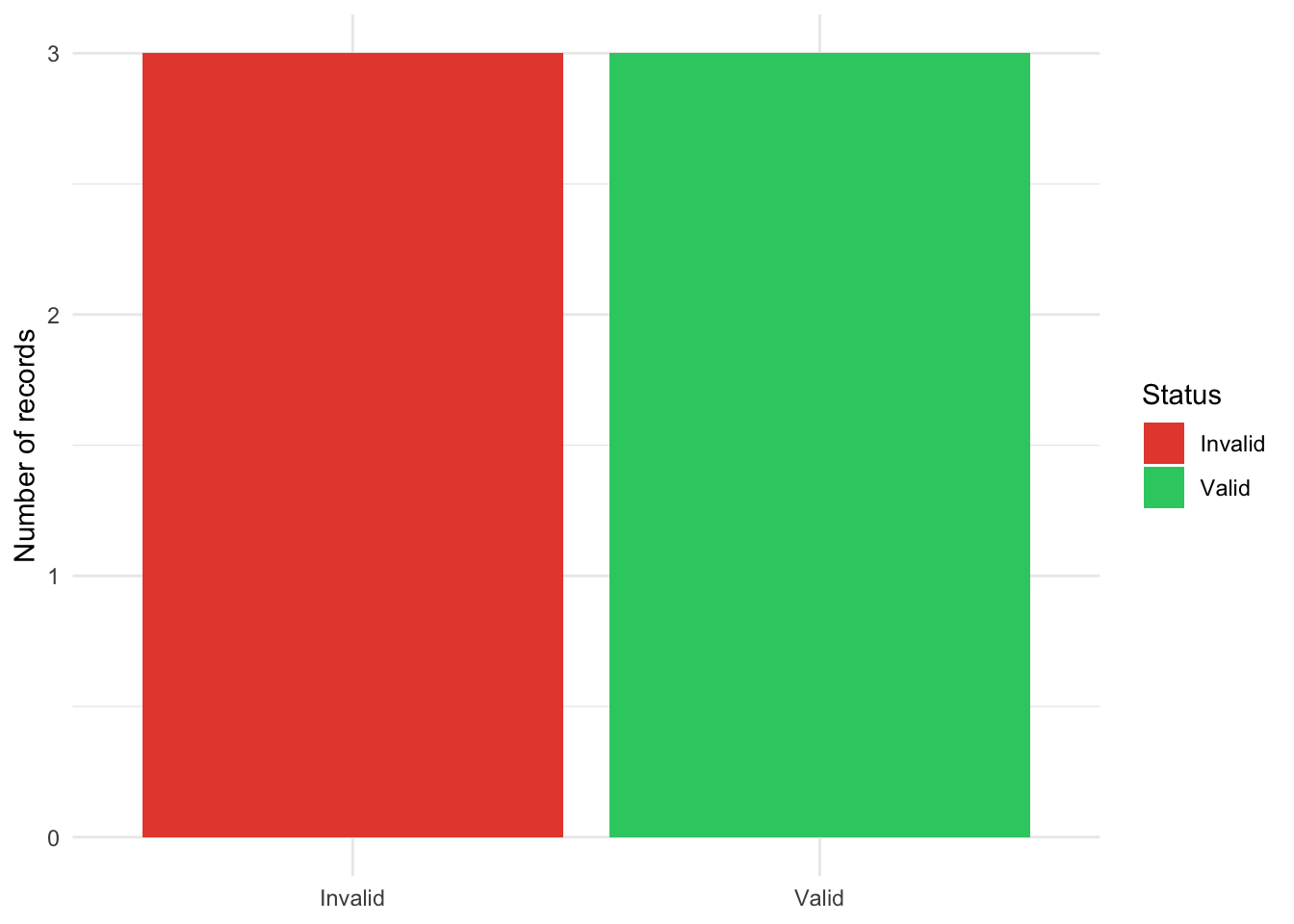
visualize_results3(validation_result)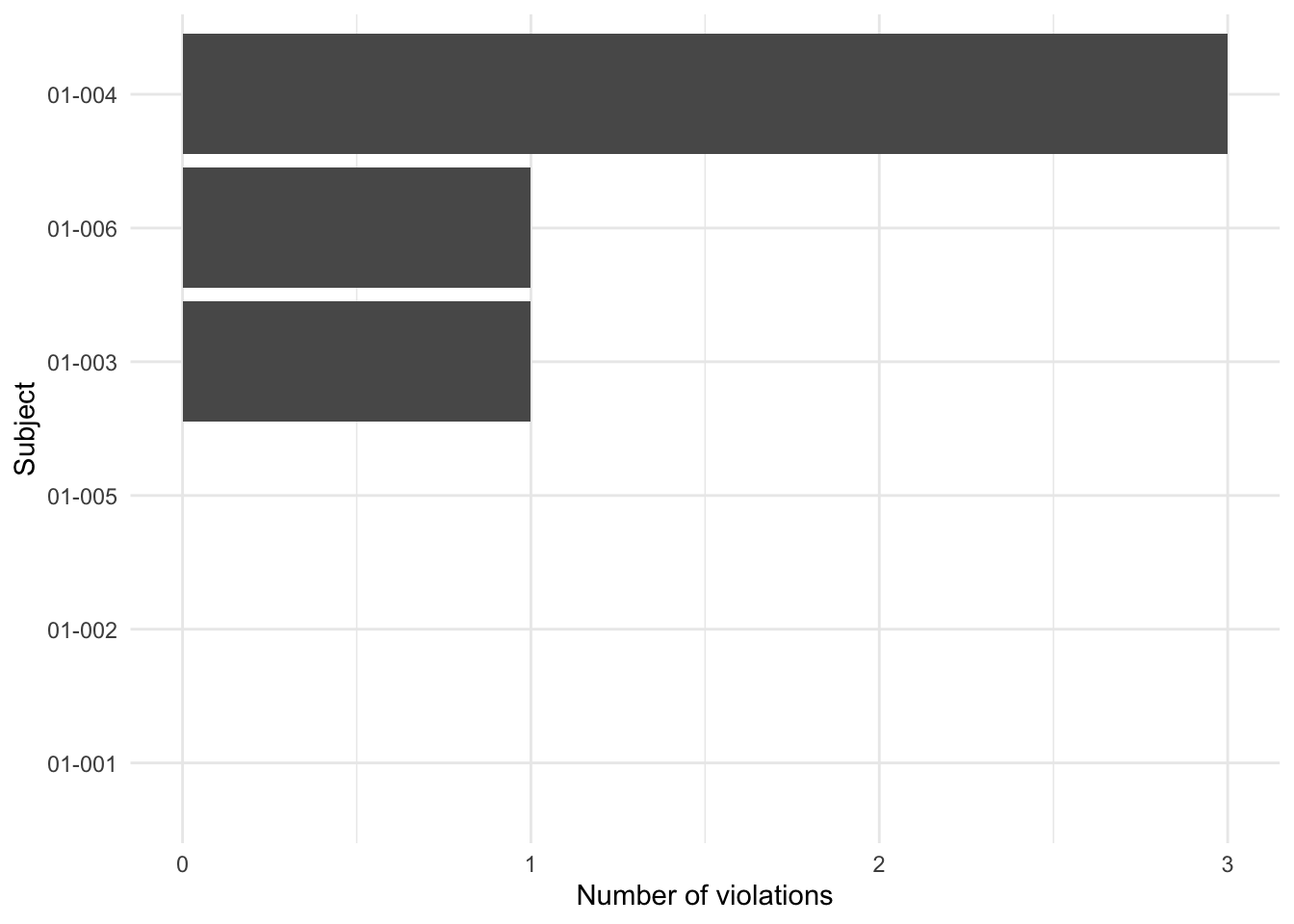
For a data validation engine, the last plot tends to be the most actionable because it immediately highlights the worst offending records.
Common Patterns and Recipes
Range Checks
rules_range <- list(
  age_range = list(
    expr = ~ AGE < 18 | AGE > 120,
    msg = "Age must be between 18 and 120"
  ),
  weight_range = list(
    expr = ~ WEIGHT < 30 | WEIGHT > 250,
    msg = "Weight must be between 30 and 250 kg"
  )
)
Presence Checks
rules_presence <- list(
  id_not_missing = list(
    expr = ~ is.na(USUBJID),
    msg = "Subject ID cannot be missing"
  ),
  date_complete = list(
    expr = ~ is.na(ENR_DATE) | ENR_DATE == "",
    msg = "Enrollment date must be specified"
  )
)
Format Validation
rules_format <- list(
  date_format = list(
    expr = ~ !grepl("^\\d{4}-\\d{2}-\\d{2}$", ENR_DATE),
    msg = "Date must be in YYYY-MM-DD format"
  ),
  email_format = list(
    expr = ~ !grepl("^[a-zA-Z0-9._%+-]+@[a-zA-Z0-9.-]+\\.[a-zA-Z]{2,6}$", EMAIL),
    msg = "Invalid email format"
  )
)
Conditional Checks
rules_conditional <- list(
  # If treatment is "Placebo", then dose must be zero
  placebo_zero_dose = list(
    expr = ~ TRTP == "Placebo" & DOSE != 0,
    msg = "Placebo must have zero dose"
  ),

  # If value is missing, flag specific column
  aval_not_missing = list(
    expr = ~ is.na(AVAL),
    msg = "AVAL cannot be missing"
  )
)
Reference Data Checks
# Predefined reference values
reference_values <- tibble(
  code = c("M", "F", "U"),
  description = c("Male", "Female", "Unknown")
)

rules_reference <- list(
  sex_known_values = list(
    expr = ~ !is.na(SEX) & !(SEX %in% reference_values$code),
    msg = glue("Invalid SEX code. Must be one of: {paste(reference_values$code, collapse = ", ")}")
  )
)
Group-Specific Validation
# Define group-specific rules
group_rules <- list(
  control_group = list(
    list(expr = ~ TRTP == "Placebo" & DOSE != 0,
         msg = "Control group must receive zero dose"),
    list(expr = ~ TRTP == "Placebo" & !is.na(TRTA),
         msg = "Control group TRTA should be empty")
  ),

  treatment_group = list(
    list(expr = ~ TRTP == "Drug A" & DOSE < 10,
         msg = "Treatment group requires dose ≥ 10"),
    list(expr = ~ TRTP == "Drug A" & DOSE > 200,
         msg = "Treatment group dose too high (>200)")
  ),

  # Default rules for all groups
  common_rules = list(
    list(expr = ~ is.na(USUBJID),
         msg = "Subject ID required for all subjects"),
    list(expr = ~ nchar(TRTP) < 1,
         msg = "Treatment name must be specified")
  )
)


# Apply group-specific validation
validation_result <- clinical_data |>
  mutate(group = case_when(
    TRTP == "Placebo" ~ "control",
    TRTP %in% c("Drug A", "Drug B") ~ "treatment",
    TRUE ~ "other"
  )) |>
  group_by(group) |>
  ks_check_rules(
    rules = group_rules[[cur_group()]],
    mode = "all"
  ) |>
  ungroup()
Best Practices
Modular Rule Definitions: Organize rules into logical groups (entity-specific, business-specific, technical)
Descriptive Error Messages: Include enough context to help data stewards understand and fix issues
Validation Layering: Apply rule sets in logical sequences (format checks → range checks → business rules)
Performance Considerations:
- Order performance-intensive rules first
- Use “first” mode for critical validation paths
- Consider caching rule compilation results
Documentation: Every rule should have clear documentation explaining:
- What the rule checks
- Why it matters
- Expected data patterns
Configuration Management: Store rule parameters externally whenever possible for easier maintenance
Graceful Degradation: Allow partial validation when complete rule sets aren’t available
Integration Testing: Always validate with realistic test data that includes boundary cases
Conclusion
The ks_check_rules() framework represents a robust and flexible approach to data validation. By providing granular control over validation rules, performance-optimized execution, and clear error reporting, it enables data teams to build reliable validation pipelines.
Key Benefits
Modular Architecture
- Rules are decoupled from business logic
- Easy to extend and maintain
- Supports dynamic rule configuration
- Early-exit “first” mode for critical validation
Seamless tidyverse Integration
- Supports custom rule definitions
- Integrates naturally with data processing pipelines
- Works with standard tidyverse verbs (
mutate(),filter(), etc.)
Future Roadmap
- Enhanced rule documentation with metadata standards
- Improved error message templates
- Advanced validation patterns for cross-dataset checks
- Performance optimizations for large datasets
Final Thoughts
This validation framework represents more than just error checking—it’s a strategic data governance mechanism. By investing in thoughtful validation patterns today, organizations can prevent downstream data issues, improve data quality, and reduce long-term maintenance costs.
The modular design allows for incremental adoption: start with basic schema validation, then progressively add business rules, cross-field checks, and custom validation patterns. With comprehensive documentation and practical examples, ks_check_rules aims to become an essential tool for serious data practitioners.